Prepare the right API access
Your approved developer app and advertiser-authorized Marketing API token determine which resources you can manage. Read the TikTok API setup guide →
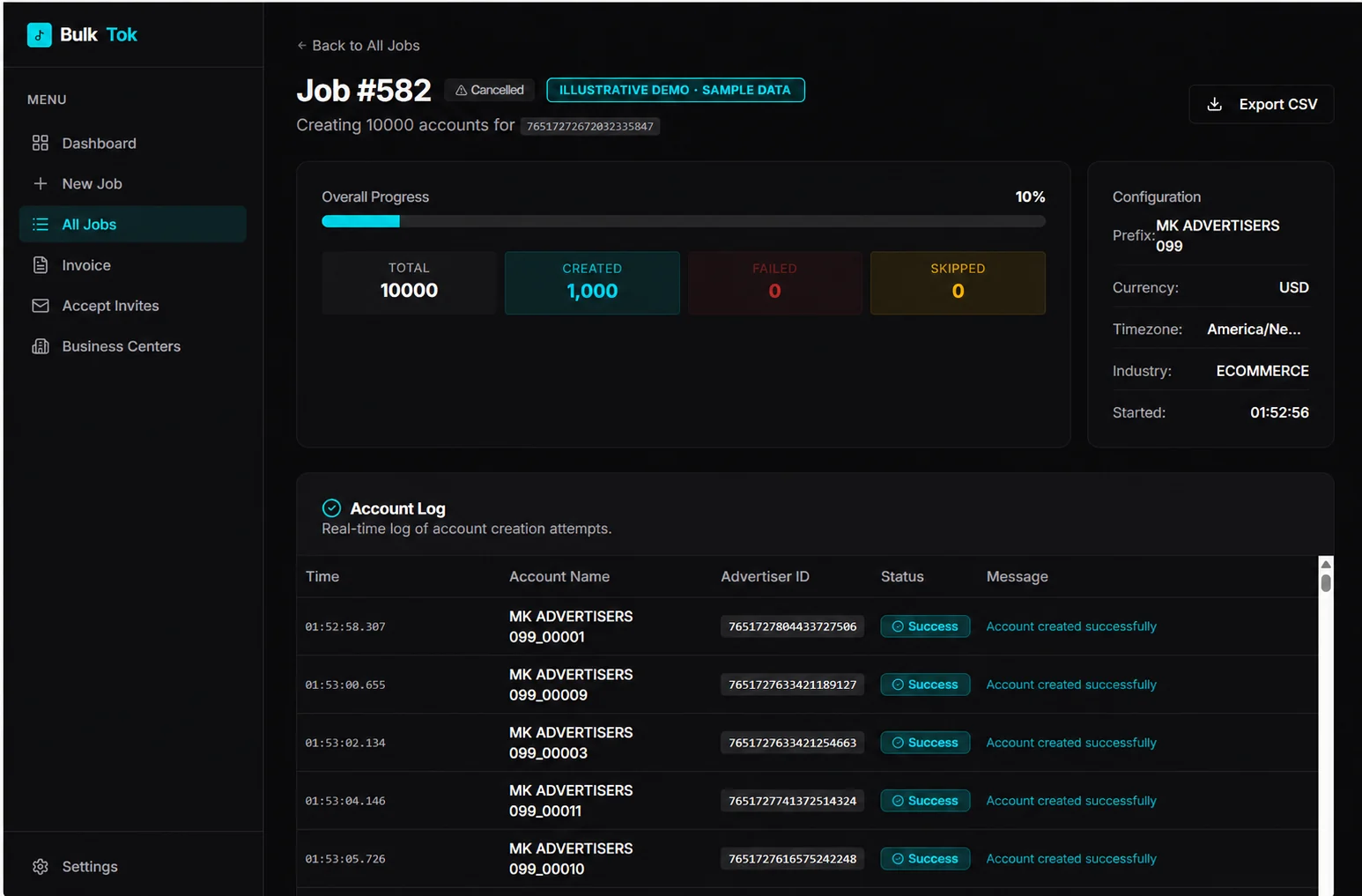
A TikTok ads tool for single and bulk ad account creation in your authorized Business Center. Connect your Marketing API token, submit requests within TikTok’s limits, and track every result.
Already registered? Open your workspace.
 Open your workspace
 Illustrative product preview · sample data.
Actual results depend on your TikTok permissions and available limits. Only your own or explicitly authorized Business Centers are allowed.
AdverGrove helps you submit advertiser account requests through TikTok’s official Business API and keep the results in one workspace.
Your approved developer app and advertiser-authorized Marketing API token determine which resources you can manage. Read the TikTok API setup guide →
Use a base name, numbered prefixes and your available Business Center quota. Review the legal company details before submitting. Learn the account creation workflow →
Separate successful and failed requests, check returned advertiser IDs and understand API error messages before retrying. Get help with an error →
Purposeful tools that help you move from account setup to a clear, traceable result.
Choose your quantity and base name. Numbered prefixes keep each account request easy to identify.
Successful accounts and failed requests have their own views, with timestamps, advertiser IDs, and error messages.
Use your own Marketing API access token, or authorize through TikTok OAuth. Tokens are encrypted on the server.
This tool can create advertiser accounts only within the limits, permissions, and quota provided by TikTok for your app and Business Center. It does not bypass TikTok restrictions or increase your account quota. A subscription does not guarantee account creation, approval, or additional capacity.
Sign up, review the monthly plan, and arrange payment. Access becomes active after an administrator verifies your payment.
An approved TikTok API for Business app and suitable resource permissions are required. Connect OAuth or supply your own access token.
Submit account requests under TikTok’s provided limits and review a result for each completed request.
Get the complete account operations workspace for $50 per month. Bring your own TikTok API access.
An AdverGrove subscription provides the software workspace. TikTok app approval, API credentials, advertiser permissions, and account quota come from TikTok.
Read the setup guide →Registration is free. Software access is activated after payment review. TikTok limits and approval requirements apply.
TikTok API credentials are required to use the tool. For Marketing API integrations, your developer app has an App ID and Secret, sometimes informally called API keys. API requests use an advertiser-authorized access token.
AdverGrove cannot create TikTok developer approval, permissions, or tokens without TikTok authorization. Never paste your App Secret or access token into public chat or a shared document.
Open TikTok API for Business ↗Independent tutorial by Justin Stolpe · November 2024. Shows app creation and obtaining access tokens with an SDK. TikTok’s interface and requirements may change; follow the official guide above for current requirements.
Watch on YouTube ↗ · App creation: 1:07 · Access tokens: 4:15
Visit TikTok API for Business, complete developer onboarding, and create a developer app under My Apps. Request the API products and permissions you need. TikTok may require review and additional approval.
Open your approved app’s details in My Apps. Keep the Secret on a trusted backend. These are developer-app credentials; an Ads Manager login or a Pixel Events API token is not a Marketing API credential.
Register the exact callback URL used by your integration. For AdverGrove’s configured OAuth app, the callback is:
https://talentory-account-factory-v2.mannanpersonal1234.workers.dev/auth/tiktok/callbackYour own developer app must use its own configured backend and matching callback. Do not share its Secret.
Use your app’s TikTok authorization link. The advertiser signs in and grants permitted resources; TikTok returns an authorization code. Your backend exchanges it with App ID and Secret via /open_api/v1.3/oauth2/access_token/
After your AdverGrove access is active, open Connections and securely save your own Marketing API token. Alternatively, use Connect TikTok & Generate Access Token to authorize AdverGrove’s configured app. Only your own Business Center, or one you are explicitly authorized to manage, can be used. TikTok checks the connected token’s permissions on every request.
No. Account creation is limited by the permissions and quota TikTok provides to your developer app, account, and Business Center. AdverGrove does not bypass restrictions, suspensions, or daily limits.
An active AdverGrove subscription, a valid TikTok Marketing API access token, the required API permissions, and authorized access to your Business Center. OAuth also depends on a configured and approved developer app.
The monthly plan is $50, settled as 50 USDT on the TRC20 network. Once a receiving address is configured, sign in to Billing, check the asset and network, send payment, and submit the transaction hash. An administrator verifies the deposit before activating one month of access. Transaction submission alone does not confirm payment.
No. The subscription covers AdverGrove software access. TikTok ad spend, platform fees, blockchain fees, account availability, and any required business verification are separate.
You renew manually each month, so there is no automatic debit. You can disconnect your saved token in Connections and revoke authorization through TikTok. Existing access expires on the date shown in your workspace.
One workspace. Your credentials. TikTok’s rules.